
Team games and practices
Add events directly or import the team schedule from GameChanger and SportsEngine so upcoming games become available for lineups, batting orders, and pitching plans.
Bring games and practices together with league events, player conflicts, work travel, family commitments, tournaments, rainouts, and everything else that affects when your team can actually play.
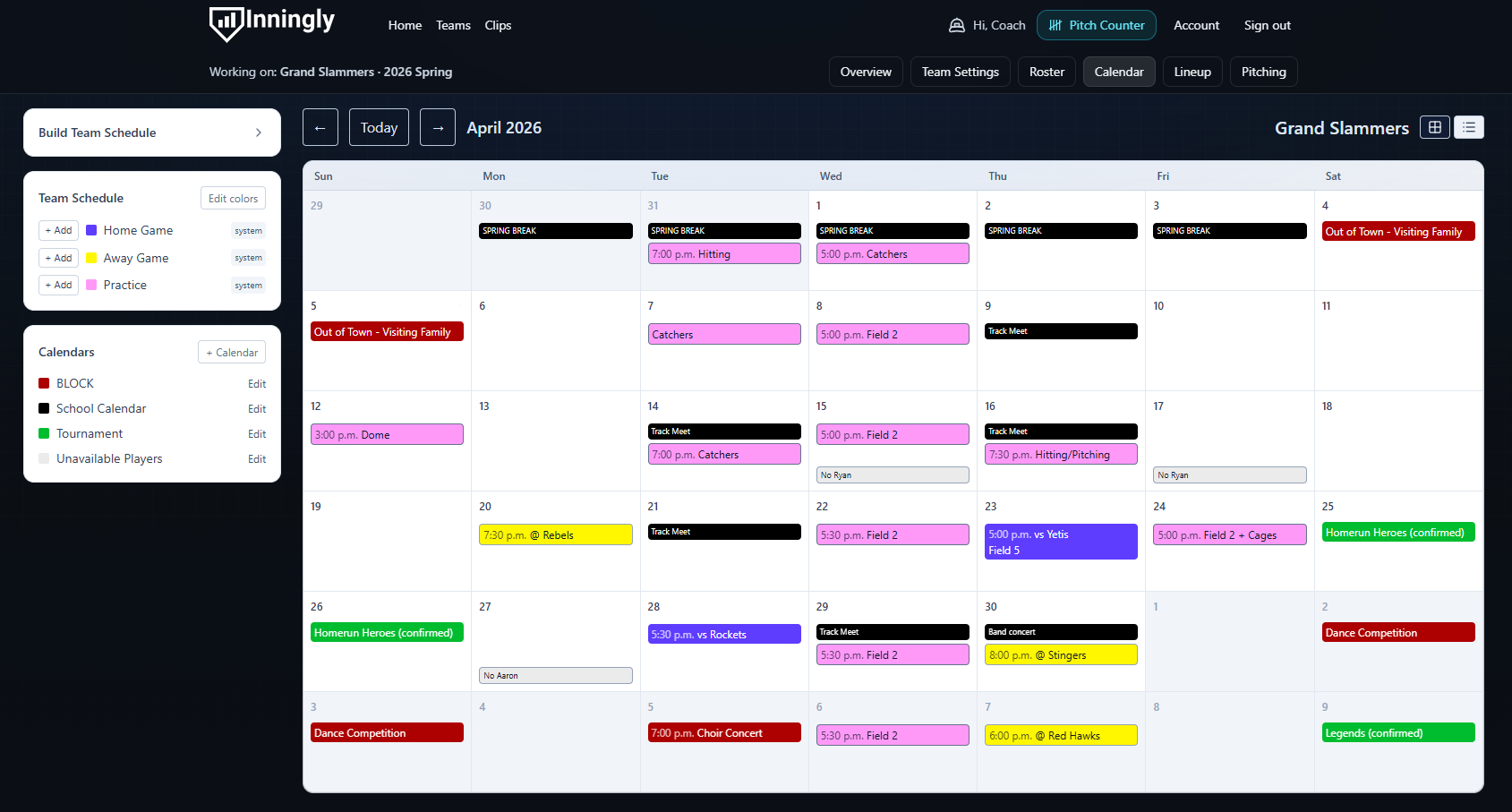
The answer depends on much more than whether Monday looks blank on the team schedule.
Inningly keeps the official schedule useful while giving coaches room to capture everything surrounding it.
Add events directly or import the team schedule from GameChanger and SportsEngine so upcoming games become available for lineups, batting orders, and pitching plans.
Add separate calendar layers for league dates, field availability, tournaments, school events, family travel, coach commitments, or any context that matters.
Turn “will miss Saturday” texts into visible planning information instead of hoping the message resurfaces when you build the lineup.
Review the surrounding dates before moving a game, filling an open tournament slot, or responding to a schedule change.
A calendar becomes a planning tool when it includes both the schedule everyone sees and the surrounding information only the coach may know.
Keep each source recognizable, show or hide the layers you need, and look at the same picture before committing the team to another date.
Start with the official schedule, add the context that matters, and use each game as the foundation for the work ahead.
Add games and practices manually or connect a GameChanger or SportsEngine calendar subscription.
Create calendar layers for player conflicts, league dates, travel, field availability, tournaments, or personal commitments.
Check the full picture before accepting a reschedule, planning a makeup game, or filling an uncertain tournament date.
Use the scheduled game to prepare player availability, the defensive lineup, batting order, and pitching plan.
Compare possible makeup dates against player conflicts, coach commitments, fields, and the rest of the schedule.
Answer with the actual team picture instead of relying on the first apparently open date.
Hold possible game windows, account for changing brackets, and see how tournament dates affect the surrounding week.
Capture the Saturday absence today so it is visible when Saturday’s lineup is built.
See work trips and family commitments alongside the team schedule without putting private detail into a team-wide app.
Keep league meetings, field restrictions, blackout dates, and other scheduling constraints in view.
Modern coaches manage schedules, player availability, weather, travel, tournament changes, pitching, lineups, parent communication, and league requirements across multiple systems. No single item is impossible; the accumulated context is the problem.
The Inningly calendar gives that context somewhere durable to live so the coach can spend less time reconstructing logistics and more time teaching the game.
Read about coaching’s hidden mental loadConnect GameChanger or SportsEngine, choose which events to include, select a primary source, and refresh the schedule when it changes.
Open the help articleSee how schedules, messages, rules, availability, pitching, and other administrative work quietly stack up around modern youth coaching.
Read the articleOnce the game is on the calendar, use player availability, pitching information, and lineup rules to prepare the game plan.
Explore fair lineup planningInningly currently supports calendar subscription links from GameChanger and SportsEngine. A team can save one connection from each provider and select the source it trusts as primary.
No. Return to the team Calendar and select Sync now when the external schedule changes. Inningly then adds new events and updates events it can match.
No. Calendar syncing is a one-way import into Inningly. For a lasting change to information controlled by the external schedule, update it at the source and sync again.
Yes. When setting up the connection, choose whether practices from GameChanger or SportsEngine should be included with game-like events.
Yes. Custom calendars can hold league events, tournament planning, field information, player conflicts, family travel, coach commitments, and other context you want visible alongside the team schedule.
A Free Team can save a calendar connection, but running Sync now requires Inningly Plus. Games and practices can still be added manually to a Free Team.
Create your Free Team, add the season schedule, and start building the planning context that usually lives in texts, apps, and memory.