
Set Lineup Rules and Restrictions
Choose the general rules Inningly should follow—or try to follow—when generating your lineup.
Last reviewed
Lineup rules tell Inningly how to distribute playing time and construct a defensive lineup across your team.
Some settings are hard rules that every generated lineup must satisfy. Others are soft preferences that guide the generator but may be set aside when necessary to produce a valid lineup.
Find the lineup rules#
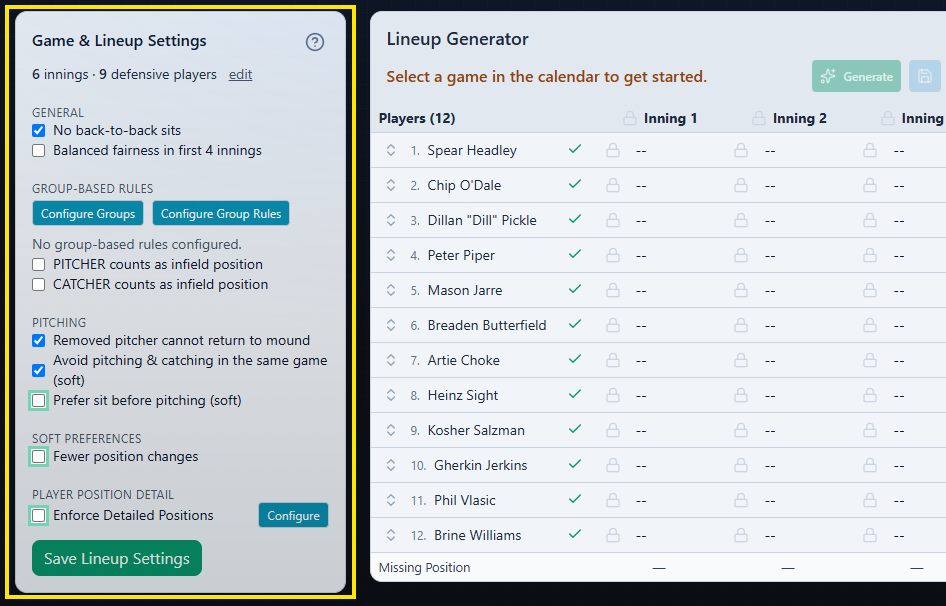
Open your team’s Lineup tab. On a desktop or tablet-width screen, the rules appear under Game & Lineup Settings to the left of the lineup grid.
Select the help-circle icon next to Game & Lineup Settings to open Rules Explained, an in-app summary of what each setting does.
The lineup settings panel is not currently available on narrow phone screens. Use a wider screen to review, change, or save these rules.
Hard rules and soft preferences#
A hard rule must be satisfied. If the rule conflicts with player availability, locked assignments, or another hard rule, Inningly cannot generate a lineup.
A soft preference influences which valid lineup Inningly chooses. The generator attempts to honor it, but it can produce a lineup that does not when other needs take priority. Soft preferences do not prevent generation by themselves.
Team-wide rules#
| Setting | Type | Default | What it does |
|---|---|---|---|
| No back-to-back sits | Hard rule | On | Prevents an available player from sitting for two consecutive innings. |
| Balanced fairness in first 4 innings | Hard rule | Off | Distributes early-game bench time more evenly across innings 1 through 4. For games shorter than four innings, it applies to the available innings. |
| Removed pitcher cannot return to mound | Hard rule | On | Allows each pitcher only one continuous pitching stint. After leaving pitcher, that player cannot return to the mound later in the generated lineup. |
| Avoid pitching & catching in the same game (soft) | Soft preference | On | Tries not to assign both pitcher and catcher to the same player during the game. If that combination is necessary, Inningly can still generate the lineup and display a heads-up message. |
| Prefer sit before pitching (soft) | Soft preference; Plus | Off | Tries to give a player a bench inning immediately before pitching. A locked field assignment in the preceding inning takes priority over this preference. |
| Fewer position changes | Soft preference; Plus | Off | Prefers longer stretches at the same position and fewer one-inning assignments. It does not require a player to remain at one position. |
Free teams can use the core hard rules and the Avoid pitching & catching preference. The additional Plus preferences are optional enhancements; see Understand Free and Plus for plan context.
Rules handled in other settings#
Two parts of the settings panel affect more focused lineup controls:
- PITCHER counts as infield position and CATCHER counts as infield position only determine how those positions are counted by group-based playing-time rules.
- Enforce Detailed Positions applies player-specific position preferences, restrictions, and position limits.
See Set player position preferences and restrictions for the player-specific controls.
How rules interact with the lineup#
Inningly must fill every defensive position once in each inning. Every available player is assigned either a field position or a sit, and the number of players who sit is determined automatically from the available roster and the number of defensive positions.
Several other choices act like hard rules during generation:
- Players marked unavailable are excluded.
- Locked positions must remain where you placed them.
- Locked sits must remain on the bench.
- Player-position restrictions must be satisfied when detailed positions are enforced.
- Enabled group-based playing-time rules must be satisfied.
Because all hard rules apply together, an individually reasonable setting can become impossible when combined with other restrictions.
For example:
- No back-to-back sits conflicts with a player locked to sit in consecutive innings.
- Removed pitcher cannot return to mound conflicts with locks that place a player at pitcher, move them elsewhere, and return them to pitcher later.
- Balanced fairness in first 4 innings may conflict with several locked sits or limited player availability.
- Multiple hard rules can leave no eligible player for a required position.
Soft preferences are different. If Inningly assigns the same player to pitcher and catcher despite the preference to avoid it, the lineup is still valid. You can review and adjust the result before saving it.
Apply or save your settings#
The checkboxes currently shown in Game & Lineup Settings are used the next time you select Generate, even if you have not saved them yet.
Select Save Lineup Settings to keep those rules for future visits and games. This saves the team’s generation settings; it does not save the defensive lineup currently shown in the grid.
If you change a setting but leave the page without saving it, the last saved settings return when the page reloads.
If the rules prevent generation#
When no lineup can satisfy the current hard rules, availability, and locks, Inningly opens Couldn’t Build This Lineup. The message identifies specific conflicts when possible.
Review the named conflict and adjust the related rule, availability choice, or lock before selecting Generate again. Turning off a soft preference will not resolve an impossible lineup because soft preferences are allowed to be broken already.
See Resolve a lineup that cannot be generated for detailed troubleshooting.
← Back to Lineups and Batting Orders
Related articles
- Create a Defensive Lineup Generate a defensive lineup using your available players, team settings, and lineup rules.
- Custom group rules for lineups Create player groups and set minimum infield, outfield, pitching, or catching requirements to match your league’s defensive lineup rules.
- Set Player Position Preferences and Restrictions Set where each player should, may, or should not play when Inningly generates a defensive lineup.
- Review, Adjust, and Save a Lineup Check a generated lineup, make manual changes, and save the version you intend to use for the game.
- Resolve a Lineup That Cannot Be Generated Use Inningly’s diagnostics to identify conflicting settings and adjust a lineup that cannot be generated.
- Create a 10-player defensive lineup Generate a defensive lineup with four outfielders based on your players, team settings and lineup rules.